
Your profile is what she reads before she writes to you.
Behind it you can take bookings, keep notes, share files, and offer sessions, packs, and courses.

For coaches
Women come here to look for a coach.
She can read how you work, then book you or write to you.
Apply to coachListing on Coachivas is free. There is no subscription and no onboarding fee.
Your profile is what she reads before she writes to you.
Behind it you can take bookings, keep notes, share files, and offer sessions, packs, and courses.
You can open with the profile and a message button.
Add bookings, a course, a free PDF or a Wheel of Life, forms, and notes when you want them.
This might be your first client.
Or you might already be coaching, and want the bookings, notes, and payments in one place.
Both can list here.

Write the profile in your own words. Add your story, specialties, languages, and qualifications, then your certificates. Finish verification and go live when the page feels like you.
Discover your coaching niche is there if you want another look at who you help. Coach tutorials are on the site, and the community forums open when they are available.
She can meet you here before you have a long client list.
Start your coaching practice
You can bring the day-to-day into one place.
Client notes, bookings, files, and payment links can sit on the same record.
Take bookings your way, keep each relationship in view, and offer packs, programmes, group classes, or a course alongside sessions.
Grow your coaching practiceYour public Coachivas profile is where she reads your work.
Add your photo, story, specialties, languages, session price, timezone, social links, certificates, articles, courses, and how she can book.
Once you are live, women looking on Find a Coach can find you.
She can read your approach and your experience before she writes.
Featured coaches get a badge and a caption they can share.
You can read and search the reviews clients leave.
Create your coach profile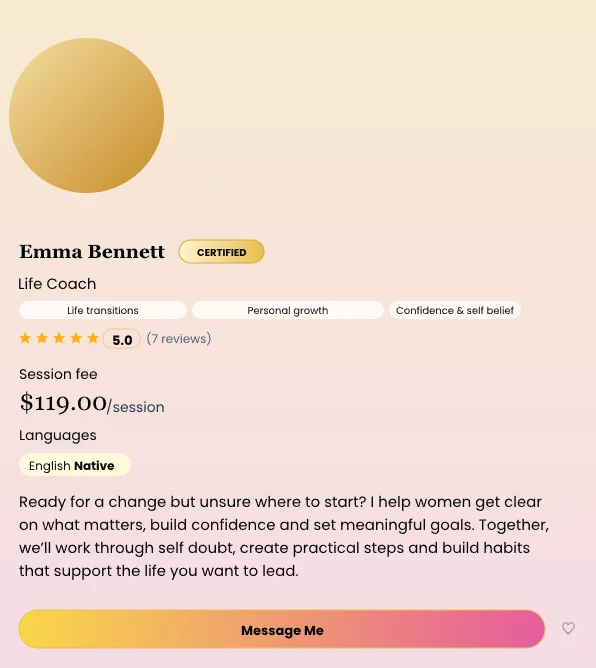
Once you are live, you get a link-in-bio page.
Put it on Instagram, LinkedIn, WhatsApp, or wherever people already find you.
Add your bio, your social accounts, and any extra links.
You choose whether people see your calendar and your posts. You can preview the page and change the design until it feels like you.
The page includes a link to your full Coachivas profile. You can remove that link if you prefer.
If you use Calendly, she can book from that page. If you choose Message me, she can write to you first. Coachivas booking stays on your full profile.
Create your link in bio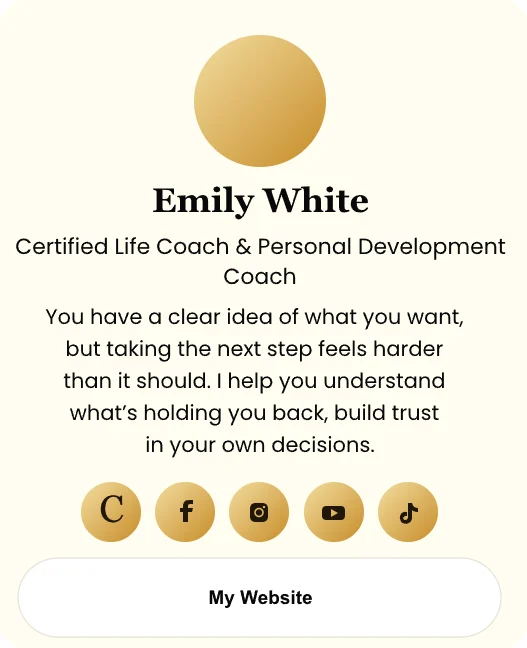
You choose one way in Manage Bookings, and you can change it later.
12%
You set your open times, session length, session price, and booking rules.
She chooses a time on your full profile and pays the price you set. The money goes to your Stripe account. Coachivas takes 12%. Stripe takes its card fee.
You can see upcoming sessions, open a day to see who is booked, and add a session from a client record.
Connect Google Calendar and a booked session is added to your calendar. You can also sync sessions from your bookings list.
Connect your own Zoom account and she receives a Zoom link for the session.
She receives a reminder email on the morning before the booking.
0%
If you already use Calendly, keep it.
Add your Calendly link to your profile and your link-in-bio page. Your calendar shows there. You arrange how she pays you, and Coachivas takes 0%.
0%
If you would rather talk before she books, choose Message me.
She writes to you before a time is booked. You take the payment yourself, so Coachivas takes 0%.
Some women know they want a session and book straight away. Some want to talk to you first.
These can sit on your profile.
On a pack or a programme, you can ask her to read and sign your agreement before she joins.
You set the prices.
You can teach a course on your profile as well as meet her one to one.
You set the title, the description, and the price.
Share it with people who follow you.
You can add a promo code for a launch or for someone who is coming back.
When she pays for the course, she pays the price you set. The payment goes to your Stripe account and Coachivas takes 12%.
Sessions, packs, programmes, and group classes can sit beside the course.
Create and sell a course
My Clients holds the people who book, buy, message you, take a free PDF or a Wheel of Life, or whom you add yourself.
You can search the list, filter it by who needs a follow-up, and export it.
On her record you can:
She might start with your free PDF. She might write with a question. She might book one session, buy a course, join a programme, or come back months later.
You can see who has booked, who has paid, who needs a follow-up, who you have already spoken to, and where she came from.
Explore My Clients
You can create one agreement for your practice. She can read it, type her name, and sign before a programme or a pack.
You can create an intake form, so you know what she wants before the first session.
You can send an exit form when the work comes to a close.
You can share notes, tasks, and files in the chat she already has with you.
She opens them in My Coach. You can see whether she opened a file or finished a task.
Your private notes stay off the inbox. The chat stays for the conversation with her.
Create a better client journey
If she is not ready to book today, you can offer a free PDF or a Wheel of Life. Show it on your profile, your link-in-bio page, or both.
When she takes it, her name and email go into My Clients.
You can see that name before you reply.
If she completes a Wheel of Life, you receive her scores and a short summary before you speak.
Create your lead magnet
You can publish posts from your profile.
Choose whether they also show on your link-in-bio page.
She can read how you see the work before she books.
You can also take Coachivas courses yourself while you build the practice.
Publish your first article12%
She pays the price you set for a session, a course, a pack, a programme, or a group class. The payment goes to your Stripe account.
On that checkout, Coachivas takes 12% and Stripe takes its card fee.
0%
A payment link from her record in My Clients is 0% to Coachivas. Stripe's card fee still applies.
Calendly and Message me stay at 0% to Coachivas, because you take that payment yourself.
Connect Stripe in account settings when you want her to pay through Coachivas.
From your coach account you can open Stripe and see invoices, payouts, and disputes.
If you use Calendly or Message me, you take the payment yourself and Coachivas takes 0%.
You can begin with your profile, your link, and a message button.
When you want them, add bookings, Google Calendar, Zoom, forms, tasks, a free PDF or a Wheel of Life, a programme, and a course.
The dashboard shows your practice in one view. Your details, password, Google Calendar, Zoom, and Stripe settings are in the same account.
In this section
These pages sit under For coaches. Read pricing and alternatives before you apply if you are still comparing.
Listing on Coachivas is free. When she pays through Coachivas, Coachivas takes 12% and the payment goes to your Stripe account. Calendly, Message me, and a My Clients pay link are 0% to Coachivas.
Apply and tell us who you help.
Listing is free after you are accepted, and there is no monthly fee. With Coachivas booking, she pays the price you set on Stripe and Coachivas takes 12%. With Calendly, Message me, or a pay link from My Clients, Coachivas takes 0%.
Certification is not a legal requirement in the US, and we do not require a specific credential. We review fit, experience, and how you work with clients. Documented training helps some applications. It does not guarantee acceptance.
Yes. Add your Calendly link. Coachivas takes 0% on those bookings, because you take the payment yourself. You can also use Coachivas booking, where the payment goes to your Stripe and Coachivas takes 12%.
Women browsing Find a coach and the specialty pages: career, confidence, burnout, relationships, life transitions, motherhood, divorce, and life coaching for women over 40. Your profile can also appear in Google Search once it is live.
Those are general directories. Coachivas is for women coaches. You get a profile people can find, Coachivas booking or Calendly, courses you create, and My clients. Read the alternatives page for a side-by-side.
Yes. You can start with a profile and a message button, then add bookings, a course, and client tools when you want them. If you want the beginner path first, read how to become a life coach.
.svg)